Customize colors when coloring by board
For teams using monday.com, the calendar view is a powerful tool to visualize tasks, deadlines, and milestones across multiple boards. However, many users face a common frustration: the lack of control over color-coding. The default settings randomly assign colors that may not align with your preference or brand.
Key pain points
- Random colors assigned can change and confuse users
- The colors may clash with brand guidelines
- No option to combine different color rules (e.g., color by status for one board and by board for another)
The workaround
To work around this issue, you can opt to add a Board color status column to each of the boards, and assign a fixed value with a fixed color.
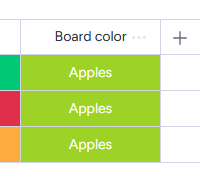
You can set this as the default board color status.
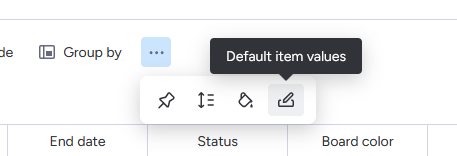
Optionally, you can choose to hide this new status column from the board.
This should solve two issues:
- Allow you to pick a fixed colour for those boards.
- Since all boards now have status columns, you can combine it with a “colour by status” for the other boards.
Note that Calendar Plus supports mixing multiple column types to color by!
The result:
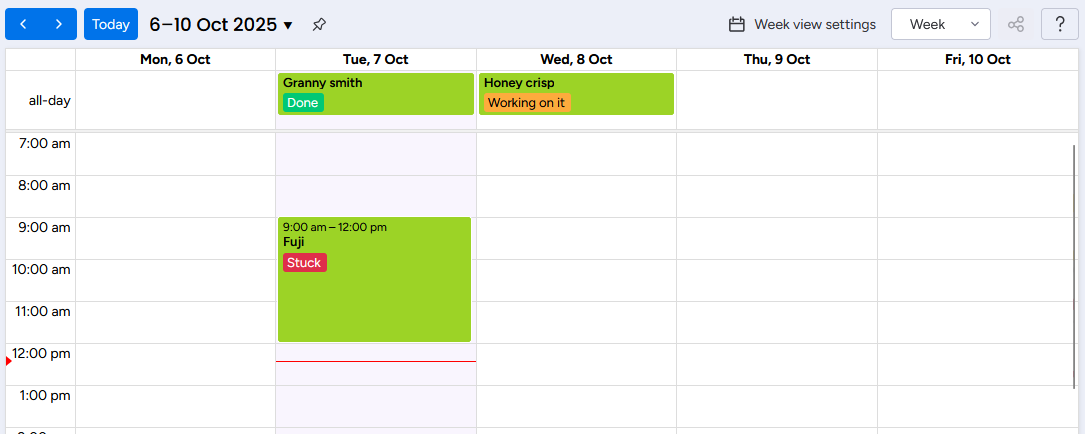
Lastly, if very specific brand colors are important, you can perform the same trick with the Color picker column type. This will only work with Calendar Plus, though, as it supports coloring by color picker, and mixing with different column types, like the status column.
Go further with Calendar Plus
Calendar Plus expands your color-coding possibilities with almost all column types. For complete setup instructions, check out the Calendar Plus how-to guide.
These are the column types supported by each calendar respectively.
| Column Type | Monday | Calendar Plus |
|---|---|---|
| Board | ✅ | ✅ |
| Checkbox | ❌ | ✅ |
| Connected items | ✅ | ❌ |
| Country | ❌ | ✅ |
| Creation log | ❌ | ✅ |
| Date | ❌ | ✅ |
| Dependencies | ❌ | ✅ |
| Dropdown | ✅ | ✅ |
| ❌ | ✅ | |
| Files | ❌ | ✅ |
| Group | ✅ | ✅ |
| Hour | ❌ | ✅ |
| Item ID | ❌ | ✅ |
| Last updated | ❌ | ✅ |
| Link | ❌ | ✅ |
| Location | ❌ | ✅ |
| Name | ❌ | ✅ |
| Number | ❌ | ✅ |
| People | ✅ | ✅ |
| Phone number | ❌ | ✅ |
| Priority | ✅ | ✅ |
| Progress | ❌ | ✅ |
| Rating | ❌ | ✅ |
| Status | ✅ | ✅ |
| Subitems | ✅ | ❌ |
| Tags | ❌ | ✅ |
| Text | ❌ | ✅ |
| Timeline | ❌ | ✅ |
| Time zone | ❌ | ✅ |
| Vote | ❌ | ✅ |
| Week | ❌ | ✅ |
